
Best Free Wingdings Converter Tools For Instant Results
- CASE CONVERTER TOOLS

- Mar 17, 2025
- 7 min read

Best Wingdings Converter tools make it easy to turn text into Wingdings symbols and back into readable words. Wingdings in an old font made of symbols instead of letters. It started as a fun way to add icons to documents, but now, people use it to send secret messages, create puzzles, and make memes.
The Problem?
Wingdings isn't easy to read. You can't type it like normal text and expect others to understand. That's why these converters are useful and they instantly transform Wingdings into readable text (or vice versa).
In this blog, I'll share the best free Wingdings converters and fun ways to use them.
The Unexpected Comeback of Wingdings (Why Are People using It Again?)
Wingdings was once just a weird font with symbols. Most people forgot about it. But now, It's getting popular again.
Why?
Secret Messages and Hidden Text
Some people use wingdings to hide messages in a fun way. Since it looks like random symbols, only
someone with a Wingdings converter can read it. This makes it great for inside jokes or secret notes.
The Gaming Connection (Undertale & Gaster)
If you've heard of Undertale, you might know W.D. Gaster, a hidden character who "speaks" in Wingdings. Fans use Wingdings converters to decode their messages and create their Gaster-style text. This has made the fonts popular among gamers and meme lovers.
Social Media & Meme Culture
Wingdings is popping up on twitter, Reddit, and TikTok in funny and creative ways. Some people post in Wingdings to confuse others, while others use it to make unique-looking text for memes and jokes.
Fun, Puzzles, and Codebreaking
Some, websites and puzzle makers use wingdings alphabet as a code for people to crack. It adds an extra challenge for those who love mystery and problem-solving.
Best Free Wingding Converter Tools
Case Converter. Tools Wingdings Translator

The Case Converter Wingdings Translator tool allows you to converter regular text into Wingdings symbols and vice versa.
The Tool provides a simple and efficient way to transform your text into these symbols and decode them back to readable text.
Fun Ways to Use It
Use this tool to create coded messages for your social media posts by incorporating Wingdings symbols.
Key Features
Instant conversion between text and Wingdings symbols. And even encode & decode the text.
Supports multiple Wingdings styles, including Wingdings 2, Wingdings 3, and Webdings.
Character Calculator Wingdings Translator
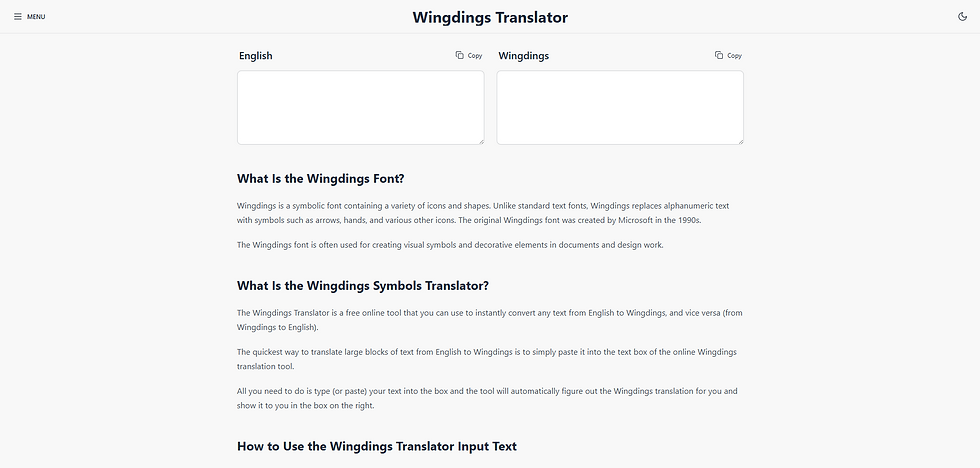
Character Calculator offers Wingdings Translator that enables users to convert text between English and Wingdings symbols instantly.
Fun Ways to Use It
The tool is ideal for crafting hidden messages or adding a creative touch to your documents and designs by incorporating Wingdings symbols.
Key Features
Instant bi-directional conversion between English text and Wingdings symbols.
User-friendly interface with automatic translation upon text input.
Allows copying and pasting of Wingdings symbols into any platform supporting Unicode characters.

WingdingTranslator.net is an online utility that enable users to convert standard text into Wingdings symbols and vice versa.
Fun Ways to Use It
Use this translator to create coded messages or add a unique flair to your social media posts by incorporating Wingdings symbols.
Key Features
Supports multiple symbol fonts, including Wingdings 1, Wingdings 2, Wingdings 3, and Webdings.
Provides a user-friendly interface with instant conversion.
Offers simple copy-and-paste functionality for easy use across platforms.
Ensures compatibility with most platforms through Unicode support.
NexTranslator Wingdings Converter

The NexTranslator Wingding Converter is an online tool that allows users to convert regular English text into Wingdings symbols and vice versa.
It supports multiple Wingdings styles, including Wingdings 1, Wingdings 2, Wingdings 3, and Webdings, offering a comprehensive translation experience.
Fun Ways to Use It
This tool is perfect for creating cryptic messages, decorative text, or puzzles, adding a unique twist to your communication.
Key Features
Supports multiple Wingdings styles: Wingdings, Wingdings 2, Wingdings 3, and Webdings.
Bi-directional conversion between regular text and Wingdings symbols.
User-friendly interface with instant conversion.
Lingojam Wingdings Translator

LingoJam Offers a straight forward online Wingdings Translator that allows users to convert regular English text into Wingdings symbols and vice versa.
Fun Ways to Use It
This translator is perfect for creating coded messages or adding a unique twist to your social media content by incorporating Wingdings symbols.
Key Features
Bi-directional conversion between English text and Wingdings symbols.
User-friendly interface with real-time translation.
Supports translation for W.D. Gaster's language from the game Undertale when using all capital letters.
dCode Wingdings Font Translator

dCode offers a comprehensive Wingdings Font Translator that allows users to encode and decode messages using the Wingdings font.
Fun Ways to Use It
Use this translator to create messages or add a distinctive flair to your social media posts by incorporating Wingdings symbols.
Key Features
Bi-directional conversion between text and Wingdings symbols.
User-friendly interface with real-time translation.
Provides detailed correspondence between characters and their Wingdings symbols, aiding in manual decoding.
Offers translation for related fonts like Wingdings 2, Wingdings 3, and Webdings.
Creative Fabrica Wingdings Translator

Creative Fabrica provides an online Wingdings translator that enable users to convert standard text into Wingdings symbols and vice versa.
Fun Ways to Use It
Utilize this translator to craft coded messages or infuse a unique flair into your social media posts by incorporating wingdings symbols.
Key Features
Instant conversion between text and Wingdings symbols.
User-friendly design for effortless input and immediate translations.
Fun Translations Wingdings Translator

The Fun Translations Translator is an online tool that convert regular English text into Wingdings Symbols.
Fun Ways to Use It
Create cryptic messages or add a unique flair to your social media posts by incorporating Wingdings symbols using this translator.
Key Features
Translates English text to Wingdings symbols and vice versa.
Simple design for easy input and instant translations.
Provides sample phrases to demonstrate the translation process.
Offers code to embed the translator on your website.
Inflact Wingdings Translator

Inflact offers Wingdings Translator that allows users to convert regular text into the Wingdings font, a symbolic typeface.
Fun Ways to Use It
Use this translator to create coded messages or add a distinctive flair to your social media posts by incorporating Wingdings symbols.
Key Features
Instantly converts text to Wingdings symbols.
User-friendly interface with real-time conversion.
AHelp Wingdings translator

AHelp Provides an online Wingdings Translator that allows users to convert standard English text into Wingdings symbols and vice versa.
Fun Ways to Use It
This translator is perfect for crafting coded messages or adding a unique twist to your digital content by incorporating Wingdings symbols.
Key Features
User-friendly interface requiring no registration or credit card information.
Supports unique symbols and emojis for a smoother translation process.
Versatile applications, from encoding charts and texts to playful pranks.
FreeFontsStyle.com Wingdings Translator

FreeFontsStyle.com offers an advanced Wingdings Translator that allows users to convert regular text into Wingdings symbols and vice versa.
Fun Ways to Use It
Use this translator to create intriguing designs, craft secret messages, or add a distinctive flair to your social media posts with Wingdings symbols.
Key Features
Supports multiple symbol fonts, including Wingdings, Wingdings 2, and Webdings.
Offers both text-to-symbols and symbols-to-text conversion.
Provides real-time text statistics, including character and word count.
Features options for auto-convert, preview size adjustment, and the ability to copy or download the converted output.
Includes a Wingdings character reference chart for easy symbol lookup.
Toolzu Wingdings Translator

Toolzu provides Wingdings Translator that allows users to convert regular text into Wingdings symbols and vice versa.
Fun Ways to Use It
Use this translator to create coded messages or add a unique flair to your social media posts by incorporating Wingdings symbols.
Key Features
User-friendly interface with real-time conversion.
TextAlter Wingdings Converter

TextAlter provides Wingdings Converter tool that allows users to transform standard text into Wingdings symbols and vice versa.
Fun Ways to Use It
Use this converter to add a creative touch to your social media posts or design projects by incorporating Wingdings symbols.
Key Features
Instant conversion between text and Wingdings symbols.
User-friendly interface with real-time translation.
MadeInText Wingding Translator

MadeInText offers Wingding Translator that allows users to convert standard text into Wingdings symbols and vice versa.
Fun Ways to Use It
Use this translator to create secret messages or add a creative touch to your documents and designs by incorporating Wingdings symbols.
Key Features
Instant conversion between text and Wingdings symbols.
User-friendly interface with real-time translation.
Using Wingdings for Jokes, Pranks, & Secret Messages
Wingdings is one of the easiest ways to play a harmless prank. Since most people can’t read it without a converter, you can send texts that look like secret codes or even make someone believe they’ve discovered a hidden message.
How People Use Wingdings for Pranks
Type a message in Wingdings and act like it has a hidden meaning.
Drop a Wingdings message on social media and see how people react.
Make it look like an encrypted message.
Tell them it’s an ancient language and see how long they try to figure it out.
Turning Wingdings into a Fun Challenge with Puzzles and Codes
Wingdings isn’t just for pranks—it’s also a great way to create puzzles, secret codes, and hidden messages. Since most people don’t recognize the symbols right away, it adds an element of mystery.
How People Use Wingdings for Puzzles & Codes
Write a sentence in Wingdings and challenge others to decode it.
Use Wingdings in a scavenger hunt or escape room-style game.
Mix Wingdings with other symbols to create a unique code.
Share Wingdings puzzles in group chats or on social media.
Using Wingdings to Make Your Social Media Posts Stand Out
Social media is all about grabbing attention, and Wingdings is a fun way to make your posts unique. Since most people don’t see Wingdings often, it immediately makes a caption or comment stand out.
How People Use Wingdings on Social Media
Post a Wingdings message and make people guess what it says.
Add Wingdings symbols to make your profile look different.
Share text in Wingdings and tell people to decode it for a secret meaning.
Post a Wingdings comment and see how many people ask for a translation.
Gamers and Undertale Fans Using Wingdings for Fun and Mystery
Wingdings isn’t just for pranks and social media—it has a strong connection to gaming, especially for fans of Undertale. In the game, a hidden character named W.D. Gaster speaks in Wingdings, making it a key part of mystery and lore.
How Gamers Use Wingdings
Fans use Wingdings converters to decode messages linked to W.D. Gaster.
Some gamers design new characters and secret texts using Wingdings.
Wingdings puzzles are sometimes used in fan games and community events.
Players post Wingdings messages to reference Undertale’s secret lore.
Conclusion
Wingdings is more than just a font, it’s a fun way to create pranks, puzzles, secret messages, and unique social media posts.
Whether you want to confuse friends, design creative captions, or explore gaming lore, free Wingdings converters make it easy. With so many tools available, you can quickly turn any text into symbols and back.


Comments